Lab 4.6: X-Ray + ServiceLens + Synthetics (Deep Dive)
Skills covered: 4.1.2, 4.1.5, 4.2.4, 4.2.5, 4.2.6, 4.2.8
Tổng quan Workshop
Workshop này build một ứng dụng serverless hoàn chỉnh, sau đó dùng X-Ray, ServiceLens, và Synthetics để observe, trace, và monitor proactively.
Architecture
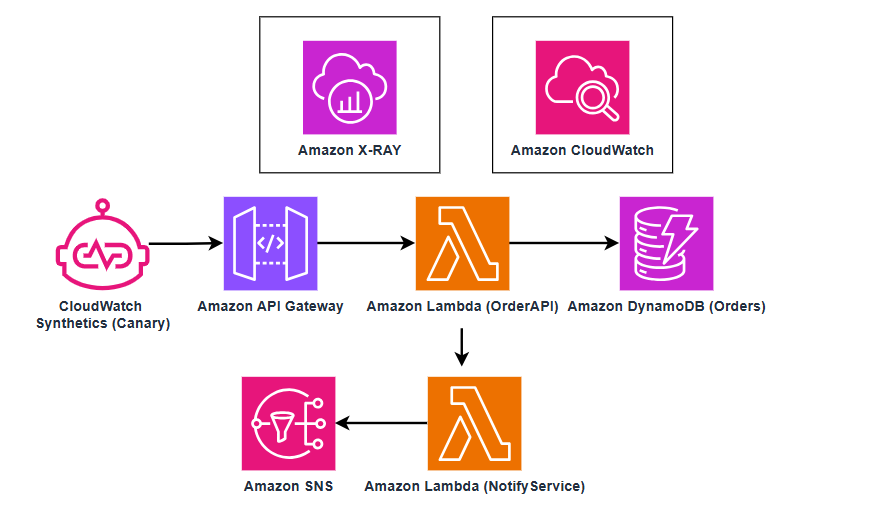
Thời gian ước tính: 90-120 phút (manual) hoặc 60 phút (dùng CloudFormation)
Quick Start: Deploy bằng CloudFormation (Khuyến nghị)
Thay vì tạo từng resource thủ công trong Phần 1, bạn có thể deploy toàn bộ backend bằng 1 CloudFormation stack. Sau đó nhảy thẳng tới Phần 2 để bắt đầu hands-on với X-Ray, ServiceLens, Synthetics.
Cách deploy
- Mở CloudFormation Console → Create stack → With new resources
- Chọn Upload a template file → upload file YAML bên dưới (hoặc paste vào Template is ready → Amazon S3 URL nếu bạn upload lên S3)
- Stack name:
lab46-xray-servicelens - Parameters:
NotificationEmail: nhập email của bạn (sẽ nhận SNS notifications)
- ✅ Check I acknowledge that AWS CloudFormation might create IAM resources with custom names
- Click Create stack
- Đợi status = CREATE_COMPLETE (~3-5 phút)
- Vào tab Outputs → copy
ApiUrl→ dùng cho các bước tiếp theo - Check email → confirm SNS subscription
Sau khi deploy xong, nhảy tới Bước 1.7: Test API để verify, rồi tiếp tục Phần 2: Khám phá AWS X-Ray.
CloudFormation Template
Lưu nội dung bên dưới thành file lab46-stack.yaml:
AWSTemplateFormatVersion: '2010-09-09'
Description: >
  Lab 4.6 - X-Ray + ServiceLens + Synthetics Workshop
  Deploys: DynamoDB, SNS, Lambda x2 (with X-Ray), API Gateway (with X-Ray),
  S3 bucket for canary artifacts, CloudWatch Alarm

Parameters:
  NotificationEmail:
    Type: String
    Description: Email address for SNS notifications (you must confirm the subscription)
    AllowedPattern: '^[a-zA-Z0-9._%+-]+@[a-zA-Z0-9.-]+\.[a-zA-Z]{2,}$'

Resources:

  # ============================================================
  # DynamoDB Table
  # ============================================================
  OrdersTable:
    Type: AWS::DynamoDB::Table
    Properties:
      TableName: Orders
      BillingMode: PAY_PER_REQUEST
      AttributeDefinitions:
        - AttributeName: orderId
          AttributeType: S
      KeySchema:
        - AttributeName: orderId
          KeyType: HASH

  # ============================================================
  # SNS Topic + Email Subscription
  # ============================================================
  OrderNotificationsTopic:
    Type: AWS::SNS::Topic
    Properties:
      TopicName: OrderNotifications

  EmailSubscription:
    Type: AWS::SNS::Subscription
    Properties:
      TopicArn: !Ref OrderNotificationsTopic
      Protocol: email
      Endpoint: !Ref NotificationEmail

  # ============================================================
  # S3 Bucket for Synthetics Canary Artifacts
  # ============================================================
  CanaryArtifactsBucket:
    Type: AWS::S3::Bucket
    Properties:
      BucketName: !Sub 'lab46-canary-artifacts-${AWS::AccountId}'
      LifecycleConfiguration:
        Rules:
          - Id: ExpireOldArtifacts
            Status: Enabled
            ExpirationInDays: 31

  # ============================================================
  # IAM Role for Lambda Functions
  # ============================================================
  LambdaXRayRole:
    Type: AWS::IAM::Role
    Properties:
      RoleName: Lab46-LambdaXRayRole
      AssumeRolePolicyDocument:
        Version: '2012-10-17'
        Statement:
          - Effect: Allow
            Principal:
              Service: lambda.amazonaws.com
            Action: sts:AssumeRole
      ManagedPolicyArns:
        - arn:aws:iam::aws:policy/service-role/AWSLambdaBasicExecutionRole
        - arn:aws:iam::aws:policy/AWSXRayDaemonWriteAccess
        - arn:aws:iam::aws:policy/AmazonDynamoDBFullAccess
        - arn:aws:iam::aws:policy/AmazonSNSFullAccess
        - arn:aws:iam::aws:policy/service-role/AWSLambdaRole

  # ============================================================
  # Lambda: NotifyService
  # ============================================================
  NotifyServiceFunction:
    Type: AWS::Lambda::Function
    Properties:
      FunctionName: NotifyService
      Runtime: python3.12
      Handler: index.handler
      Role: !GetAtt LambdaXRayRole.Arn
      Timeout: 30
      TracingConfig:
        Mode: Active
      Environment:
        Variables:
          TOPIC_ARN: !Ref OrderNotificationsTopic
      Code:
        ZipFile: |
          import json
          import boto3
          import os
          from aws_xray_sdk.core import xray_recorder, patch_all

          patch_all()

          sns = boto3.client('sns')
          TOPIC_ARN = os.environ['TOPIC_ARN']

          def handler(event, context):
              order_id = event.get('orderId', 'unknown')

              subsegment = xray_recorder.current_subsegment()
              if subsegment:
                  subsegment.put_annotation('orderId', order_id)
                  subsegment.put_annotation('service', 'NotifyService')

              with xray_recorder.in_subsegment('PrepareNotification') as seg:
                  message = {
                      'orderId': order_id,
                      'status': 'CREATED',
                      'message': f'Order {order_id} has been created successfully'
                  }
                  seg.put_metadata('notification', message)

              with xray_recorder.in_subsegment('PublishSNS'):
                  sns.publish(
                      TopicArn=TOPIC_ARN,
                      Subject=f'New Order: {order_id}',
                      Message=json.dumps(message)
                  )

              print(json.dumps({
                  'level': 'INFO',
                  'message': 'Notification sent',
                  'orderId': order_id
              }))

              return {'statusCode': 200, 'body': 'Notification sent'}

  # ============================================================
  # Lambda: OrderAPI
  # ============================================================
  OrderAPIFunction:
    Type: AWS::Lambda::Function
    DependsOn: NotifyServiceFunction
    Properties:
      FunctionName: OrderAPI
      Runtime: python3.12
      Handler: index.handler
      Role: !GetAtt LambdaXRayRole.Arn
      Timeout: 30
      TracingConfig:
        Mode: Active
      Code:
        ZipFile: |
          import json
          import boto3
          import uuid
          import time
          from aws_xray_sdk.core import xray_recorder, patch_all

          patch_all()

          dynamodb = boto3.resource('dynamodb')
          table = dynamodb.Table('Orders')
          lambda_client = boto3.client('lambda')

          def handler(event, context):
              http_method = event.get('httpMethod', 'GET')

              subsegment = xray_recorder.current_subsegment()
              if subsegment:
                  subsegment.put_annotation('httpMethod', http_method)
                  subsegment.put_annotation('service', 'OrderAPI')

              if http_method == 'POST':
                  return create_order(event)
              elif http_method == 'GET':
                  return get_order(event)
              else:
                  return list_orders()

          def create_order(event):
              body = json.loads(event.get('body', '{}'))
              order_id = str(uuid.uuid4())[:8]

              with xray_recorder.in_subsegment('ValidateOrder') as seg:
                  product = body.get('product', 'Unknown')
                  quantity = body.get('quantity', 1)
                  seg.put_annotation('orderId', order_id)
                  seg.put_metadata('orderDetails', body)
                  if quantity <= 0:
                      return response(400, {'error': 'Invalid quantity'})

              with xray_recorder.in_subsegment('ProcessPayment'):
                  time.sleep(0.1)

              with xray_recorder.in_subsegment('SaveOrder'):
                  item = {
                      'orderId': order_id,
                      'product': product,
                      'quantity': quantity,
                      'status': 'CREATED',
                      'timestamp': int(time.time())
                  }
                  table.put_item(Item=item)

              with xray_recorder.in_subsegment('InvokeNotify'):
                  lambda_client.invoke(
                      FunctionName='NotifyService',
                      InvocationType='Event',
                      Payload=json.dumps({'orderId': order_id})
                  )

              print(json.dumps({
                  'level': 'INFO', 'message': 'Order created',
                  'orderId': order_id, 'product': product
              }))

              return response(201, {'orderId': order_id, 'status': 'CREATED'})

          def get_order(event):
              params = event.get('queryStringParameters') or {}
              order_id = params.get('orderId')
              if not order_id:
                  return response(400, {'error': 'orderId required'})

              subsegment = xray_recorder.current_subsegment()
              if subsegment:
                  subsegment.put_annotation('orderId', order_id)

              result = table.get_item(Key={'orderId': order_id})
              item = result.get('Item')
              if not item:
                  print(json.dumps({
                      'level': 'ERROR', 'message': 'Order not found',
                      'orderId': order_id
                  }))
                  return response(404, {'error': 'Order not found'})
              return response(200, item)

          def list_orders():
              with xray_recorder.in_subsegment('ScanOrders'):
                  result = table.scan(Limit=20)
              return response(200, {'orders': result.get('Items', [])})

          def response(status_code, body):
              return {
                  'statusCode': status_code,
                  'headers': {
                      'Content-Type': 'application/json',
                      'Access-Control-Allow-Origin': '*'
                  },
                  'body': json.dumps(body, default=str)
              }

  # ============================================================
  # API Gateway: REST API
  # ============================================================
  OrdersRestApi:
    Type: AWS::ApiGateway::RestApi
    Properties:
      Name: OrdersAPI
      Description: Lab 4.6 - Orders API with X-Ray tracing

  OrdersResource:
    Type: AWS::ApiGateway::Resource
    Properties:
      RestApiId: !Ref OrdersRestApi
      ParentId: !GetAtt OrdersRestApi.RootResourceId
      PathPart: orders

  # --- GET /orders ---
  OrdersGetMethod:
    Type: AWS::ApiGateway::Method
    Properties:
      RestApiId: !Ref OrdersRestApi
      ResourceId: !Ref OrdersResource
      HttpMethod: GET
      AuthorizationType: NONE
      Integration:
        Type: AWS_PROXY
        IntegrationHttpMethod: POST
        Uri: !Sub >-
          arn:aws:apigateway:${AWS::Region}:lambda:path/2015-03-31/functions/${OrderAPIFunction.Arn}/invocations

  # --- POST /orders ---
  OrdersPostMethod:
    Type: AWS::ApiGateway::Method
    Properties:
      RestApiId: !Ref OrdersRestApi
      ResourceId: !Ref OrdersResource
      HttpMethod: POST
      AuthorizationType: NONE
      Integration:
        Type: AWS_PROXY
        IntegrationHttpMethod: POST
        Uri: !Sub >-
          arn:aws:apigateway:${AWS::Region}:lambda:path/2015-03-31/functions/${OrderAPIFunction.Arn}/invocations

  # --- Lambda Permission for API Gateway ---
  ApiGatewayLambdaPermission:
    Type: AWS::Lambda::Permission
    Properties:
      FunctionName: !Ref OrderAPIFunction
      Action: lambda:InvokeFunction
      Principal: apigateway.amazonaws.com
      SourceArn: !Sub 'arn:aws:execute-api:${AWS::Region}:${AWS::AccountId}:${OrdersRestApi}/*'

  # --- Deploy API to 'dev' stage with X-Ray ---
  ApiDeployment:
    Type: AWS::ApiGateway::Deployment
    DependsOn:
      - OrdersGetMethod
      - OrdersPostMethod
    Properties:
      RestApiId: !Ref OrdersRestApi

  ApiStage:
    Type: AWS::ApiGateway::Stage
    Properties:
      RestApiId: !Ref OrdersRestApi
      DeploymentId: !Ref ApiDeployment
      StageName: dev
      TracingEnabled: true
      MethodSettings:
        - HttpMethod: '*'
          ResourcePath: '/*'
          LoggingLevel: INFO

  # ============================================================
  # CloudWatch Alarm: Lambda Errors
  # ============================================================
  OrderAPIErrorAlarm:
    Type: AWS::CloudWatch::Alarm
    Properties:
      AlarmName: OrdersAPI-Lambda-Errors
      AlarmDescription: Alert when OrderAPI Lambda has errors
      Namespace: AWS/Lambda
      MetricName: Errors
      Dimensions:
        - Name: FunctionName
          Value: !Ref OrderAPIFunction
      Statistic: Sum
      Period: 300
      EvaluationPeriods: 2
      Threshold: 5
      ComparisonOperator: GreaterThanThreshold
      AlarmActions:
        - !Ref OrderNotificationsTopic

# ============================================================
# Outputs
# ============================================================
Outputs:
  ApiUrl:
    Description: API Gateway Invoke URL (use this for testing and canary)
    Value: !Sub 'https://${OrdersRestApi}.execute-api.${AWS::Region}.amazonaws.com/dev'

  ApiUrlOrders:
    Description: Full URL to /orders endpoint
    Value: !Sub 'https://${OrdersRestApi}.execute-api.${AWS::Region}.amazonaws.com/dev/orders'

  SNSTopicArn:
    Description: SNS Topic ARN
    Value: !Ref OrderNotificationsTopic

  CanaryBucketName:
    Description: S3 bucket for Synthetics canary artifacts
    Value: !Ref CanaryArtifactsBucket

  DynamoDBTableName:
    Description: DynamoDB table name
    Value: !Ref OrdersTable

  OrderAPIFunctionArn:
    Description: OrderAPI Lambda ARN
    Value: !GetAtt OrderAPIFunction.Arn

  NotifyServiceFunctionArn:
    Description: NotifyService Lambda ARN
    Value: !GetAtt NotifyServiceFunction.Arn
Sau khi deploy CloudFormation
Stack tạo ra toàn bộ resources sau:
| Resource | Name | Mô tả |
|---|---|---|
| DynamoDB | Orders | Table lưu orders |
| SNS Topic | OrderNotifications | Notifications + email subscription |
| S3 Bucket | lab46-canary-artifacts-{account} | Cho Synthetics canary |
| IAM Role | Lab46-LambdaXRayRole | Lambda execution role |
| Lambda | NotifyService | Notify service với X-Ray |
| Lambda | OrderAPI | Main API với X-Ray |
| API Gateway | OrdersAPI | REST API, stage dev, X-Ray enabled |
| CloudWatch Alarm | OrdersAPI-Lambda-Errors | Alert khi Lambda errors > 5 |
Synthetics Canaries (Phần 4) vẫn cần tạo thủ công trên Console vì đó là phần hands-on quan trọng nhất — bạn cần hiểu cách configure canary blueprints, xem results, và tích hợp với ServiceLens.
Clean Up với CloudFormation
Khi hoàn thành workshop:
- Xóa Synthetics canaries thủ công trước (CloudFormation không quản lý chúng)
- Empty S3 bucket
lab46-canary-artifacts-*(CloudFormation không xóa được bucket có data) - CloudFormation Console → Stacks →
lab46-xray-servicelens→ Delete - Xóa thêm CloudWatch Log groups nếu còn:
/aws/lambda/OrderAPI/aws/lambda/NotifyService/aws/synthetics/*
PHẦN 1: Tạo Backend Application (30 phút)
Đã dùng CloudFormation? Nếu bạn đã deploy stack ở trên, skip toàn bộ Phần 1 và nhảy thẳng tới Bước 1.7: Test API. Lấy ApiUrl từ CloudFormation Outputs.
Bước 1.1: Tạo DynamoDB Table
- Mở DynamoDB Console → Create table
- Cấu hình:
| Setting | Value |
|---|---|
| Table name | Orders |
| Partition key | orderId (String) |
| Sort key | Không cần |
| Capacity | On-demand |
- Click Create table
- Đợi status = Active
Bước 1.2: Tạo SNS Topic
- Mở SNS Console → Topics → Create topic
- Type: Standard
- Name:
OrderNotifications - Click Create topic
- Copy Topic ARN (cần cho Lambda)
- Create subscription → Protocol: Email → Endpoint: email của bạn → Confirm email
Bước 1.3: Tạo IAM Role cho Lambda
- Mở IAM Console → Roles → Create role
- Trusted entity: Lambda
- Attach policies:
| Policy | Mục đích |
|---|---|
AWSLambdaBasicExecutionRole | CloudWatch Logs |
AWSXRayDaemonWriteAccess | X-Ray tracing |
AmazonDynamoDBFullAccess | DynamoDB access |
AmazonSNSFullAccess | SNS publish |
AWSLambdaRole | Invoke other Lambda |
- Role name:
Lab46-LambdaXRayRole - Click Create role
Production note: Trong production, dùng least-privilege policies thay vì FullAccess. Ở đây dùng FullAccess cho đơn giản trong lab.
Bước 1.4: Tạo Lambda “NotifyService”
- Lambda Console → Create function
- Cấu hình:
| Setting | Value |
|---|---|
| Function name | NotifyService |
| Runtime | Python 3.12 |
| Execution role | Lab46-LambdaXRayRole |
- Paste code:
import json
import boto3
import os
from aws_xray_sdk.core import xray_recorder, patch_all

patch_all()

sns = boto3.client('sns')
TOPIC_ARN = os.environ['TOPIC_ARN']

def handler(event, context):
    order_id = event.get('orderId', 'unknown')

    # Add X-Ray annotation (searchable)
    subsegment = xray_recorder.current_subsegment()
    if subsegment:
        subsegment.put_annotation('orderId', order_id)
        subsegment.put_annotation('service', 'NotifyService')

    # Custom subsegment for business logic
    with xray_recorder.in_subsegment('PrepareNotification') as seg:
        message = {
            'orderId': order_id,
            'status': 'CREATED',
            'message': f'Order {order_id} has been created successfully'
        }
        seg.put_metadata('notification', message)

    # Publish to SNS (auto-traced by patch_all)
    with xray_recorder.in_subsegment('PublishSNS'):
        sns.publish(
            TopicArn=TOPIC_ARN,
            Subject=f'New Order: {order_id}',
            Message=json.dumps(message)
        )

    print(json.dumps({
        'level': 'INFO',
        'message': 'Notification sent',
        'orderId': order_id
    }))

    return {'statusCode': 200, 'body': 'Notification sent'}
- Configuration → Environment variables → Add:
- Key:
TOPIC_ARN, Value: (paste SNS Topic ARN)
- Key:
- Configuration → General configuration → Timeout: 30 seconds
- Configuration → Monitoring and operations tools → Active tracing → ✅ Enable
- Deploy
Bước 1.5: Tạo Lambda “OrderAPI”
- Lambda Console → Create function
- Cấu hình:
| Setting | Value |
|---|---|
| Function name | OrderAPI |
| Runtime | Python 3.12 |
| Execution role | Lab46-LambdaXRayRole |
- Paste code:
import json
import boto3
import uuid
import time
import os
from aws_xray_sdk.core import xray_recorder, patch_all

patch_all()

dynamodb = boto3.resource('dynamodb')
table = dynamodb.Table('Orders')
lambda_client = boto3.client('lambda')

def handler(event, context):
    http_method = event.get('httpMethod', 'GET')

    # X-Ray annotations
    subsegment = xray_recorder.current_subsegment()
    if subsegment:
        subsegment.put_annotation('httpMethod', http_method)
        subsegment.put_annotation('service', 'OrderAPI')

    if http_method == 'POST':
        return create_order(event)
    elif http_method == 'GET':
        return get_order(event)
    else:
        return list_orders()
def create_order(event):
    body = json.loads(event.get('body', '{}'))
    order_id = str(uuid.uuid4())[:8]

    with xray_recorder.in_subsegment('ValidateOrder') as seg:
        product = body.get('product', 'Unknown')
        quantity = body.get('quantity', 1)
        seg.put_annotation('orderId', order_id)
        seg.put_metadata('orderDetails', body)

        if quantity <= 0:
            return response(400, {'error': 'Invalid quantity'})

    # Simulate processing time (visible in X-Ray)
    with xray_recorder.in_subsegment('ProcessPayment'):
        time.sleep(0.1)  # Simulate payment processing

    # Write to DynamoDB (auto-traced)
    with xray_recorder.in_subsegment('SaveOrder'):
        item = {
            'orderId': order_id,
            'product': product,
            'quantity': quantity,
            'status': 'CREATED',
            'timestamp': int(time.time())
        }
        table.put_item(Item=item)

    # Invoke NotifyService async (auto-traced)
    with xray_recorder.in_subsegment('InvokeNotify'):
        lambda_client.invoke(
            FunctionName='NotifyService',
            InvocationType='Event',  # Async
            Payload=json.dumps({'orderId': order_id})
        )

    print(json.dumps({
        'level': 'INFO', 'message': 'Order created',
        'orderId': order_id, 'product': product
    }))

    return response(201, {'orderId': order_id, 'status': 'CREATED'})
def get_order(event):
    params = event.get('queryStringParameters') or {}
    order_id = params.get('orderId')

    if not order_id:
        return response(400, {'error': 'orderId required'})

    xray_recorder.current_subsegment().put_annotation('orderId', order_id)

    result = table.get_item(Key={'orderId': order_id})
    item = result.get('Item')

    if not item:
        print(json.dumps({
            'level': 'ERROR', 'message': 'Order not found',
            'orderId': order_id
        }))
        return response(404, {'error': 'Order not found'})

    return response(200, item)

def list_orders():
    with xray_recorder.in_subsegment('ScanOrders'):
        result = table.scan(Limit=20)
    return response(200, {'orders': result.get('Items', [])})

def response(status_code, body):
    return {
        'statusCode': status_code,
        'headers': {
            'Content-Type': 'application/json',
            'Access-Control-Allow-Origin': '*'
        },
        'body': json.dumps(body, default=str)
    }
- Configuration → General configuration → Timeout: 30 seconds
- Configuration → Monitoring and operations tools → Active tracing → ✅ Enable
- Deploy
Bước 1.6: Tạo API Gateway
API Gateway Console → Create API → REST API → Build
API name:
OrdersAPICreate Resource:
- Resource name:
orders - Resource path:
/orders
- Resource name:
Create Method trên
/orders:- GET → Lambda Function →
OrderAPI→ Lambda Proxy Integration ✅ - POST → Lambda Function →
OrderAPI→ Lambda Proxy Integration ✅
- GET → Lambda Function →
Deploy API:
- Deploy API → New Stage → Stage name:
dev
- Deploy API → New Stage → Stage name:
Enable X-Ray trên API Gateway:
- Vào Stages →
dev→ Logs/Tracing tab - ✅ Enable X-Ray Tracing
- Save Changes
- Vào Stages →
Copy Invoke URL (dạng
https://xxxxxx.execute-api.region.amazonaws.com/dev)
Bước 1.7: Test API
Mở CloudShell hoặc terminal:
# Set API URL
API_URL="https://xxxxxx.execute-api.region.amazonaws.com/dev"

# Tạo order
curl -X POST "$API_URL/orders" \
  -H "Content-Type: application/json" \
  -d '{"product": "Laptop", "quantity": 2}'

# Response: {"orderId": "abc12345", "status": "CREATED"}

# Get order
curl "$API_URL/orders?orderId=abc12345"

# List orders
curl "$API_URL/orders"

# Tạo thêm vài orders để có data
for i in $(seq 1 10); do
  curl -s -X POST "$API_URL/orders" \
    -H "Content-Type: application/json" \
    -d "{\"product\": \"Product-$i\", \"quantity\": $i}"
  sleep 1
done
Đợi 1-2 phút sau khi gọi API để X-Ray traces xuất hiện trong console.
PHẦN 2: Khám phá AWS X-Ray (20 phút)
Bước 2.1: Xem Service Map
- Mở CloudWatch Console → X-Ray traces → Service map
- Bạn sẽ thấy:
Client → API Gateway → OrderAPI (Lambda)
                            ├── DynamoDB (Orders)
                            └── NotifyService (Lambda)
                                    └── SNS (OrderNotifications)
Quan sát trên Service Map:
- Mỗi node = 1 service (hình tròn)
- Màu sắc: 🟢 Green = OK, 🟡 Yellow = errors, 🔴 Red = faults
- Đường nối = dependency giữa services
- Hover lên node → thấy latency, request count, error rate
- Click vào node → drill down vào traces
Thử nghiệm: Click vào node OrderAPI → xem:
- Response time distribution
- HTTP status code breakdown
- Traces list
Bước 2.2: Phân tích Traces
- X-Ray traces → Traces
- Click vào 1 trace bất kỳ
- Bạn sẽ thấy Trace Timeline:
Trace Timeline (ví dụ POST /orders):
├── API Gateway (5ms)
│   └── OrderAPI Lambda (350ms)
│       ├── Initialization (150ms) ← Cold start!
│       ├── Invocation (200ms)
│       │   ├── ValidateOrder (1ms)
│       │   ├── ProcessPayment (100ms) ← Simulated delay
│       │   ├── SaveOrder - DynamoDB PutItem (15ms)
│       │   └── InvokeNotify - Lambda Invoke (5ms)
│       └── Overhead (2ms)
└── Total: ~355ms
Quan sát:
- Initialization segment = cold start time
- Subsegments = custom code sections (ValidateOrder, ProcessPayment, etc.)
- Remote calls = DynamoDB, Lambda, SNS (auto-traced bởi
patch_all()) - Click vào subsegment → xem Annotations và Metadata
Xem Annotations:
- Click vào subsegment → tab Annotations
- Thấy:
orderId = abc12345,httpMethod = POST,service = OrderAPI - Annotations là indexed → dùng để filter traces
Xem Metadata:
- Tab Metadata → thấy
orderDetailsobject - Metadata không indexed → chỉ để xem context
- Tab Metadata → thấy
Bước 2.3: Filter Traces bằng Filter Expressions
- X-Ray traces → Traces → Filter bar
- Thử các filter expressions:
# Tìm tất cả POST requests
http.method = "POST"

# Tìm orders cụ thể (dùng annotation)
annotation.orderId = "abc12345"

# Tìm requests chậm (> 500ms)
responsetime > 0.5

# Tìm errors
error = true

# Tìm requests tới OrderAPI service
service("OrderAPI")

# Combine filters
annotation.service = "OrderAPI" AND http.method = "POST" AND responsetime > 0.3
- Thử tạo error để test filter:
# Gọi GET không có orderId → 400 error
curl "$API_URL/orders?orderId=nonexistent"

# Gọi POST với invalid data
curl -X POST "$API_URL/orders" \
  -H "Content-Type: application/json" \
  -d '{"product": "Test", "quantity": -1}'
- Quay lại X-Ray → filter
error = true→ thấy error traces
Bước 2.4: Tạo Custom Sampling Rules
- X-Ray traces → Configuration → Sampling rules
- Xem Default rule: reservoir = 1/s, rate = 5%
- Create sampling rule:
| Setting | Value | Giải thích |
|---|---|---|
| Rule name | OrdersHighPriority | |
| Priority | 100 | Thấp hơn = ưu tiên cao hơn |
| Reservoir | 10 | 10 traces/second guaranteed |
| Rate | 1.0 (100%) | Trace 100% requests |
| Service name | OrderAPI | Chỉ apply cho service này |
| HTTP method | POST | Chỉ POST requests |
| URL path | /orders | Chỉ path này |
- Create thêm rule cho health checks:
| Setting | Value |
|---|---|
| Rule name | HealthCheckLowPriority |
| Priority | 200 |
| Reservoir | 0 |
| Rate | 0.01 (1%) |
| URL path | /health* |
- Hiểu sampling:
- Reservoir = guaranteed traces per second
- Rate = % of additional requests beyond reservoir
- Priority thấp = match trước
- Giúp control cost khi traffic cao
Bước 2.5: Tạo X-Ray Groups
- X-Ray traces → Configuration → Groups
- Create group:
- Name:
OrderErrors - Filter expression:
annotation.service = "OrderAPI" AND error = true
- Name:
- Create thêm group:
- Name:
SlowRequests - Filter expression:
responsetime > 1
- Name:
- Groups tự động tạo CloudWatch Metrics → dùng cho Alarms
PHẦN 3: CloudWatch ServiceLens (20 phút)
Bước 3.1: Mở ServiceLens
CloudWatch Console → ServiceLens → Service map
Bạn thấy service map tương tự X-Ray nhưng với thêm:
- CloudWatch Metrics overlay (latency, errors, requests)
- Alarm status trên mỗi node
- Log groups liên kết
Click vào node “OrderAPI” → bạn thấy 3 tabs:
| Tab | Nội dung |
|---|---|
| Overview | Latency, faults, requests/min, alarms |
| Service map | Dependencies của service này |
| Traces | X-Ray traces filtered cho service này |
Bước 3.2: Correlated View (Metrics + Logs + Traces)
- Trong ServiceLens → click OrderAPI node
- Tab Overview → thấy:
- Latency graph (p50, p90, p99)
- Fault rate graph
- Requests graph
- Scroll xuống → Related logs → click → mở CloudWatch Logs Insights
- Scroll xuống → Traces → click 1 trace → thấy full trace detail
Đây là sức mạnh của ServiceLens: Từ 1 view, bạn thấy metrics, logs, và traces cùng lúc mà không cần switch giữa các console.
Bước 3.3: Simulate Issue để Debug với ServiceLens
- Tạo lỗi cố ý — Update Lambda
OrderAPI, thêm random error:
import random

# Thêm vào đầu function create_order():
def create_order(event):
    # Simulate random failures (30% chance)
    if random.random() < 0.3:
        print(json.dumps({
            'level': 'ERROR',
            'message': 'Database connection timeout',
            'errorType': 'TimeoutError'
        }))
        raise Exception('Simulated database timeout')

    # ... rest of code
- Deploy Lambda
- Generate traffic với errors:
# Gọi 30 requests để tạo mix success/failure
for i in $(seq 1 30); do
  curl -s -X POST "$API_URL/orders" \
    -H "Content-Type: application/json" \
    -d "{\"product\": \"StressTest-$i\", \"quantity\": 1}" &
done
wait
echo "Done sending requests"
Đợi 2-3 phút → Quay lại ServiceLens → Service map
Quan sát:
- Node OrderAPI chuyển sang 🟡 hoặc 🔴
- Fault rate tăng lên ~30%
- Click vào node → thấy error traces
- Click vào error trace → thấy Exception message
- Correlated logs → thấy “Database connection timeout”
Root Cause Analysis flow:
ServiceLens Service Map → Thấy OrderAPI node đỏ
  → Click node → Overview tab → Fault rate 30%
  → Traces tab → Filter: error = true
  → Click trace → Thấy Exception: "Simulated database timeout"
  → Related logs → Thấy ERROR log với details
  → Kết luận: Database connection issue
- Revert lỗi — Xóa random error code, Deploy lại
Bước 3.4: ServiceLens Traces View
- ServiceLens → Traces
- Thử các filter:
- Duration > 500ms
- Status: Fault
- Service: OrderAPI
- Click vào trace → thấy Trace Map (visual flow) + Segments Timeline
- Mỗi segment có:
- Duration
- Status (OK/Error/Fault/Throttle)
- Annotations
- Metadata
- Exceptions (nếu có)
PHẦN 4: CloudWatch Synthetics (30 phút)
Bước 4.1: Tạo S3 Bucket cho Canary Artifacts
- S3 Console → Create bucket
- Bucket name:
lab46-canary-artifacts-{account-id}(phải unique) - Region: same region với API
- Giữ defaults → Create bucket
Bước 4.2: Tạo API Canary (Heartbeat)
- CloudWatch Console → Synthetics Canaries → Create canary
- Chọn Use a blueprint → Heartbeat monitoring
- Cấu hình:
| Setting | Value |
|---|---|
| Name | orders-api-health |
| Application or endpoint URL | https://xxxxxx.execute-api.region.amazonaws.com/dev/orders |
| Schedule | Every 5 minutes |
| Data retention | Failure: 31 days, Success: 31 days |
| S3 bucket | lab46-canary-artifacts-{account-id} |
| Access permissions | Create a new role |
Mở phần Additional configuration:
- ✅ Active tracing (tích hợp X-Ray)
- Timeout: 60 seconds
Click Create canary
Đợi canary start → status chuyển sang Running
Bước 4.3: Tạo API Canary (API Test — Advanced)
- Create canary → Use a blueprint → API canary
- Name:
orders-api-crud-test - Chọn Inline Editor → paste script:
const { URL } = require('url');
const synthetics = require('Synthetics');
const log = require('SyntheticsLogger');

const apiCanaryBlueprint = async function () {
    const API_URL = 'https://xxxxxx.execute-api.region.amazonaws.com/dev';

    // Step 1: Create Order (POST)
    log.info('Step 1: Creating order...');
    let createResponse = await synthetics.executeHttpStep(
        'Create Order',
        new URL(`${API_URL}/orders`),
        {
            method: 'POST',
            headers: { 'Content-Type': 'application/json' },
            body: JSON.stringify({
                product: 'CanaryTestProduct',
                quantity: 1
            })
        }
    );
    // Parse response
    let responseBody = JSON.parse(createResponse.body || '{}');
    let orderId = responseBody.orderId;
    log.info(`Order created: ${orderId}`);

    if (!orderId) {
        throw new Error('Failed to create order - no orderId returned');
    }

    // Step 2: Get Order (GET)
    log.info(`Step 2: Getting order ${orderId}...`);
    let getResponse = await synthetics.executeHttpStep(
        'Get Order',
        new URL(`${API_URL}/orders?orderId=${orderId}`)
    );

    let orderData = JSON.parse(getResponse.body || '{}');
    log.info(`Order data: ${JSON.stringify(orderData)}`);

    // Verify order data
    if (orderData.product !== 'CanaryTestProduct') {
        throw new Error(`Expected product 'CanaryTestProduct', got '${orderData.product}'`);
    }

    // Step 3: List Orders (GET)
    log.info('Step 3: Listing orders...');
    let listResponse = await synthetics.executeHttpStep(
        'List Orders',
        new URL(`${API_URL}/orders`)
    );

    let listData = JSON.parse(listResponse.body || '{}');
    log.info(`Total orders: ${listData.orders ? listData.orders.length : 0}`);

    log.info('All API tests passed!');
};

exports.handler = async () => {
    return await apiCanaryBlueprint();
};
- Schedule: Every 10 minutes
- ✅ Active tracing
- S3 bucket: same bucket
- Create canary
Bước 4.4: Monitor Canary Results
- Synthetics Canaries → click
orders-api-health - Đợi vài runs (5-10 phút) → bạn thấy:
| Tab | Nội dung |
|---|---|
| Availability | Success rate % over time (graph) |
| Duration | Response time per run (graph) |
| Runs | List of all runs với status (Pass/Fail) |
| Monitoring | CloudWatch metrics |
| Configuration | Canary settings |
Click vào 1 Run → thấy:
- Steps: Mỗi HTTP step với status, duration
- Logs: Execution logs chi tiết
- HAR file: HTTP Archive (network waterfall)
- Screenshots: (cho visual canaries)
Click vào Monitoring tab → thấy CloudWatch Metrics:
SuccessPercent— % runs thành côngDuration— thời gian chạyFailed— số runs thất bại
Bước 4.5: Tạo Alarm cho Canary
- CloudWatch → Alarms → Create alarm
- Select metric → CloudWatch Synthetics → By Canary Name
- Chọn
orders-api-health→ metricSuccessPercent - Cấu hình:
| Setting | Value |
|---|---|
| Statistic | Average |
| Period | 15 minutes |
| Threshold | Less than 90 |
| Datapoints to alarm | 2 out of 3 |
- Notification → Select SNS topic
OrderNotifications - Alarm name:
OrdersAPI-Canary-HealthCheck - Create alarm
Bước 4.6: Test Canary Failure Detection
- Tạo lỗi cố ý — Vào API Gateway:
- Stages →
dev→ Stage Variables - Hoặc đơn giản hơn: vào Lambda
OrderAPI→ thêm lỗi:
- Stages →
# Thêm vào đầu handler:
def handler(event, context):
    # Force error for canary testing
    raise Exception("Intentional outage for testing")
- Deploy Lambda
- Đợi 10-15 phút (2-3 canary runs)
- Quan sát:
- Canary status → Failed (đỏ)
- Availability graph → drop xuống 0%
- CloudWatch Alarm → In Alarm state
- Email notification từ SNS
- Revert — Xóa
raise Exceptionline, Deploy lại - Đợi canary recover → status trở lại Passing
Bước 4.7: Xem Canary trong ServiceLens
- ServiceLens → Service map
- Bạn sẽ thấy Synthetics canary xuất hiện như 1 node riêng
- Canary node kết nối tới API Gateway node
- Khi canary fail → node hiển thị error indicators
- Click canary node → thấy availability metrics
Service Map với Synthetics:

[Canary: orders-api-health] → API Gateway → OrderAPI → DynamoDB
                                                      → NotifyService → SNS
PHẦN 5: Tổng hợp Dashboard (15 phút)
Bước 5.1: Tạo Unified Dashboard
- CloudWatch → Dashboards → Create dashboard
- Name:
OrdersApp-Observability - Thêm widgets:
Row 1 — API Health:
| Widget | Type | Metric |
|---|---|---|
| API Availability | Number | Synthetics → SuccessPercent |
| API Latency | Line | API Gateway → Latency (p50, p90, p99) |
| API Errors | Line | API Gateway → 5XXError |
- Add widget → Number → Metric: CloudWatch Synthetics →
orders-api-health→SuccessPercent
Row 2 — Lambda Performance:
- Add widget → Line → Metrics:
- Lambda →
OrderAPI→ Duration (Average, p99) - Lambda →
OrderAPI→ Errors - Lambda →
OrderAPI→ Throttles - Lambda →
OrderAPI→ ConcurrentExecutions
- Lambda →
Row 3 — DynamoDB:
- Add widget → Line → Metrics:
- DynamoDB →
Orders→ ConsumedReadCapacityUnits - DynamoDB →
Orders→ ConsumedWriteCapacityUnits
- DynamoDB →
Row 4 — Logs:
- Add widget → Logs table → Log group:
/aws/lambda/OrderAPI- Query:
fields @timestamp, @message
| filter @message like /ERROR/
| sort @timestamp desc
| limit 10
Row 5 — Alarms:
Add widget → Alarm status → Select all alarms
Save dashboard
Bước 5.2: Review Dashboard
Dashboard hoàn chỉnh cho bạn single-pane-of-glass view:
┌─────────────────────────────────────────────────────┐
│ OrdersApp-Observability Dashboard                    │
├──────────────┬──────────────┬───────────────────────┤
│ API Avail:   │ API Latency  │ API 5XX Errors        │
│   99.5%      │ [line graph] │ [line graph]          │
├──────────────┴──────────────┴───────────────────────┤
│ Lambda Duration (p50/p99)  │ Lambda Errors/Throttles│
│ [line graph]               │ [line graph]           │
├────────────────────────────┴────────────────────────┤
│ DynamoDB RCU/WCU                                     │
│ [line graph]                                         │
├──────────────────────────────────────────────────────┤
│ Recent Errors (Logs Insights)                        │
│ 2025-02-14 10:23 ERROR Order not found orderId=xyz  │
├──────────────────────────────────────────────────────┤
│ Alarms: ✅ All OK                                    │
└──────────────────────────────────────────────────────┘
PHẦN 6: Clean Up
Quan trọng: Xóa resources để tránh phát sinh chi phí.
Xóa theo thứ tự:
- Synthetics → Stop + Delete cả 2 canaries
- CloudWatch → Delete dashboard
OrdersApp-Observability - CloudWatch → Delete alarm
OrdersAPI-Canary-HealthCheck - API Gateway → Delete API
OrdersAPI - Lambda → Delete
OrderAPIvàNotifyService - DynamoDB → Delete table
Orders - SNS → Delete topic
OrderNotifications - S3 → Empty + Delete bucket
lab46-canary-artifacts-* - IAM → Delete role
Lab46-LambdaXRayRole - X-Ray → Delete sampling rules và groups (nếu tạo)
- CloudWatch Logs → Delete log groups:
/aws/lambda/OrderAPI/aws/lambda/NotifyService/aws/synthetics/orders-api-health/aws/synthetics/orders-api-crud-test
Kiểm tra kiến thức
X-Ray
- Hiểu Service Map: nodes, edges, health colors
- Phân biệt Annotations (indexed, searchable) vs Metadata (not indexed)
- Viết Filter Expressions:
annotation.key = "value",responsetime > 1,error = true - Hiểu Sampling Rules: reservoir, rate, priority
-
patch_all()auto-traces AWS SDK calls -
xray_recorder.in_subsegment()cho custom segments - X-Ray Groups → tự động tạo CloudWatch Metrics
ServiceLens
- ServiceLens = Metrics + Logs + Traces trong 1 view
- Service Map với health indicators
- Correlated view: click trace → thấy related logs + metrics
- Root Cause Analysis workflow: Map → Node → Traces → Logs
- ServiceLens miễn phí (trả phí X-Ray, Logs, Metrics riêng)
Synthetics
- Canary = script chạy định kỳ monitor endpoints
- Blueprint types: Heartbeat, API Canary, Broken Link, Visual
- Canary metrics: SuccessPercent, Duration, Failed
- Tích hợp X-Ray (Active tracing)
- Tích hợp ServiceLens (hiển thị trên Service Map)
- Canary artifacts lưu trong S3 (logs, HAR, screenshots)
- Tạo CloudWatch Alarms dựa trên canary metrics
Tổng hợp
- Observability = Metrics + Logs + Traces (3 pillars)
- X-Ray cho distributed tracing
- ServiceLens cho correlated observability
- Synthetics cho proactive monitoring (outside-in)
- Dashboard cho single-pane-of-glass view
Exam Tips tổng hợp
X-Ray:
patch_all()= auto-instrument AWS SDK, HTTP, SQL calls- Annotations = indexed, dùng cho filter expressions
- Metadata = not indexed, dùng cho additional context
- Sampling rules control cost (reservoir + rate)
- Lambda:
Tracing: Active. API GW: Stage settings. ECS: sidecar daemon - Beanstalk: X-Ray daemon auto-runs khi enabled trong environment config
ServiceLens:
- Kết hợp CloudWatch Metrics + Logs + X-Ray Traces
- Service Map hiển thị dependencies và health
- Dùng cho root cause analysis trong distributed systems
- Miễn phí (chỉ trả phí underlying services)
Synthetics:
- Canaries = proactive monitoring scripts
- Phát hiện issues trước khi users gặp
- Metrics: SuccessPercent, Duration → tạo Alarms
- Active tracing → traces xuất hiện trong X-Ray/ServiceLens
- Canary blueprints: Heartbeat (simple), API (multi-step), Visual (screenshots)